<?xml version="1.0" encoding="utf-8"?><feed xmlns="http://www.w3.org/2005/Atom" ><generator uri="https://jekyllrb.com/" version="4.2.2">Jekyll</generator><link href="https://theresponsetimes.com/feed.xml" rel="self" type="application/atom+xml" /><link href="https://theresponsetimes.com/" rel="alternate" type="text/html" /><updated>2024-03-11T20:31:14+00:00</updated><id>https://theresponsetimes.com/feed.xml</id><title type="html">The Response Times</title><subtitle>Another Programming Blog</subtitle><entry><title type="html">LINK.social Exposed Users’ Sensitive Information &amp;amp; Mass Account Hijacking</title><link href="https://theresponsetimes.com/link-social-exposing-sensitive-personal-information/" rel="alternate" type="text/html" title="LINK.social Exposed Users’ Sensitive Information &amp;amp; Mass Account Hijacking" /><published>2022-07-14T15:00:00+00:00</published><updated>2022-07-14T15:00:00+00:00</updated><id>https://theresponsetimes.com/link-social-exposing-sensitive-personal-information</id><content type="html" xml:base="https://theresponsetimes.com/link-social-exposing-sensitive-personal-information/"><![CDATA[<p>On July 9th I was able to access sensitive information from every account on <a href="https://www.link.social/" target="_blank">link.social’s</a> app. This information includes: <strong>phone number</strong>, <strong>last location</strong> (accurate to within 10-15 feet), <strong>birthday</strong>, and if they verified their identity with a government photo ID card, and some other less sensitive fields. In addition to this, I found a simple exploit that allows me to <strong>hijack any account</strong> on the platform.</p>

<p>I disclosed what I found to the LINK team on July 10th 2022, the next day early on Monday on July 11th they responded and said they were working on a fix. On the 12th they thanked me for bringing it to their attention and sent me $500 (which was nice) and they updated their app to fix it, although trilateration to find location might still possible.</p>

<h3 id="table-of-contents">Table of Contents</h3>
<ul id="markdown-toc">
  <li><a href="#table-of-contents" id="markdown-toc-table-of-contents">Table of Contents</a></li>
  <li><a href="#what-is-link" id="markdown-toc-what-is-link">What is LINK</a></li>
  <li><a href="#what-data-is-exposed" id="markdown-toc-what-data-is-exposed">What Data is Exposed</a>    <ul>
      <li><a href="#why-this-is-a-problem" id="markdown-toc-why-this-is-a-problem">Why This Is A Problem</a>        <ul>
          <li><a href="#location-data" id="markdown-toc-location-data">Location Data</a></li>
          <li><a href="#phone-number--name" id="markdown-toc-phone-number--name">Phone Number &amp; Name</a></li>
          <li><a href="#account-hijacking" id="markdown-toc-account-hijacking">Account Hijacking</a></li>
        </ul>
      </li>
    </ul>
  </li>
  <li><a href="#vulnerabilities" id="markdown-toc-vulnerabilities">Vulnerabilities</a>    <ul>
      <li><a href="#exposing-sensitive-user-information" id="markdown-toc-exposing-sensitive-user-information">Exposing Sensitive User Information</a>        <ul>
          <li><a href="#mitigation" id="markdown-toc-mitigation">Mitigation</a></li>
        </ul>
      </li>
      <li><a href="#account-hijacking-1" id="markdown-toc-account-hijacking-1">Account Hijacking</a>        <ul>
          <li><a href="#mitigation-1" id="markdown-toc-mitigation-1">Mitigation</a></li>
        </ul>
      </li>
    </ul>
  </li>
  <li><a href="#location-visualization" id="markdown-toc-location-visualization">Location Visualization</a></li>
  <li><a href="#links-response" id="markdown-toc-links-response">LINK’s Response</a></li>
  <li><a href="#takeaways" id="markdown-toc-takeaways">Takeaways</a></li>
</ul>

<h3 id="what-is-link">What is LINK</h3>

<p>LINK is another social media startup app that enables you to meet people local to you with the same hobbies as you in a group setting. They’re currently in a beta stage with testing on the iOS test flight app. Despite being in beta, they’re running social media campaigns trying to get people to use the test flight app and have around 6.5K users while writing this.</p>

<p>Each user has a profile where you can select different hobbies that you have and you’ll be given other people with your hobbies in your local area as defined by your range limit. If both users select to “link/connect” with each other they’ll be able to talk in the app.</p>

<p>I discovered this app when as a part of their social media marketing campaign they requested to follow me on Instagram and I decided to check out their system a little.</p>

<h3 id="what-data-is-exposed">What Data is Exposed</h3>
<ul>
  <li>Personal Sensitive Information (on every user, even if you’re not logged in as that user)
    <ul>
      <li>phone number</li>
      <li>birthday</li>
      <li>last known location</li>
      <li>full name
        <ul>
          <li>Not sensitive by itself, but in combination with other information can be damaging</li>
        </ul>
      </li>
      <li>id verified
        <ul>
          <li>The app asks users to verify with their government issued ID using a 3rd party (not required though)</li>
          <li>Can use this to see if the account is really who they’re claiming to be</li>
        </ul>
      </li>
    </ul>
  </li>
  <li>Account hijacking
    <ul>
      <li>If you know the user id (easy to find) you can hijack any account and get authorization tokens for it</li>
      <li>Do anything that typically requires a user to be logged in
        <ul>
          <li>Profile changes</li>
          <li>Send/read messages</li>
          <li>Update user’s saved location</li>
        </ul>
      </li>
    </ul>
  </li>
</ul>

<h4 id="why-this-is-a-problem">Why This Is A Problem</h4>

<h5 id="location-data">Location Data</h5>

<p>I won’t go into too much detail, but checkout my article about <a href="/yikyak-is-exposing-user-locations/#why-its-a-problem" target="_blank">YikYak Is Exposing User Location Data</a> for some deeper location data specific comments. However, this is much more dangerous than YikYak as not only were precise locations (accurate to within 10-15 feet) exposed but full names were associated with the location. This escalates the dangers compared to YikYak as it really enables targeted attacks using a person’s location data.</p>

<p>Some things a malicious attacker could use this for</p>
<ul>
  <li>Stalking a particular user who might’ve denied their link request on the app</li>
  <li>Knowing when a particular individual might be home or not</li>
  <li>Using the other personal information to reverse search that user and find out their exact address to escalate this stalking potential</li>
  <li>An abusive partner could use this data to find the location of a former partner trying to escape and hide from them</li>
  <li>Unlawfully surveil people across time (accuracy depends on how frequently they open the app)</li>
  <li>I’m sure you could come up with some other potential consequences</li>
</ul>

<h5 id="phone-number--name">Phone Number &amp; Name</h5>

<ul>
  <li>Reverse person search to find even more information about a particular individual</li>
  <li>Telemarketers could utilize this information
    <ul>
      <li>Access to birthdays could target older people using the app for scams</li>
      <li>Hobby information is also included in the app, so highly targeted ads towards hobbies of a user could be used in this direct texting marketing campaign</li>
    </ul>
  </li>
</ul>

<h5 id="account-hijacking">Account Hijacking</h5>

<ul>
  <li>Tons of options here but not as dangerous as the sensitive information above</li>
  <li>Can delete any account</li>
  <li>Marketers could change profile/bio to advertise a service</li>
  <li>Huge volumes of spam could arise</li>
  <li>Any consequence having someone take over your account</li>
</ul>

<h3 id="vulnerabilities">Vulnerabilities</h3>

<h4 id="exposing-sensitive-user-information">Exposing Sensitive User Information</h4>

<p>This is another case of an app sending back <strong>ALL</strong> information about a specific user rather than just the information needed in the client. This sensitive information is never exposed to the end user since the app itself filters it down, however this unnecessary sensitive information should <strong>never</strong> be sent to the app itself, as it’s typically easy to intercept this information.</p>

<p>All of this information is returned on the “feed” page where you can view the accounts you haven’t interacted with so far. This data is also returned when you view a user’s profile which the endpoint for that looks like <code class="language-plaintext highlighter-rouge">{user_id}.json</code>. The user ids in the database just increment themselves by 1, so it’s extremely easy to write a script that iterates over every user in the database and just makes a request to this endpoint to retrieve all the user data.</p>

<h6 id="mitigation">Mitigation</h6>

<p>The best way to fix this, is ensuring that only the information needed in the app is actually sent to it. For example: If the developers wanted an option in the app to get a person’s phone number they should ensure that this field is only sent after both parties have hit that button. Sending unnecessary information that should never be needed like birthday, precise last location, and other strange things like the phone confirmation number, should never be sent to the client. It’s typically extremely easy to intercept this information and you should assume that any information that’s sent out of your API server is accessible to the end user.</p>

<p>For ensuring that exact location isn’t visible or calculable, check out my <a href="/yikyak-is-exposing-user-locations/#mitigations-recommended" target="_blank">YikYak mitigation recommendations</a> for more details but here’s what I recommend.</p>
<ul>
  <li>Truncate the GPS coordinates on the app itself so that when the location is sent to the server it’s not super accurate.
    <ul>
      <li>I recommend cutting it off around the 2nd decimal place, as this will make the data inaccurate to within ~3 miles (<a href="http://wiki.gis.com/wiki/index.php/Decimal_degrees" target="_blank">Wiki GIS</a>) which should protect user privacy</li>
    </ul>
  </li>
  <li>The API should never return an exact location, rounding the distance should be done on the server to be accurate to within a few miles
    <ul>
      <li>This could also be randomized every time a user requests the location from a profile by a few hundred feet just for more protection</li>
    </ul>
  </li>
</ul>

<h4 id="account-hijacking-1">Account Hijacking</h4>

<p>This is where it gets fun :)</p>

<p>The ordering of the API requests to create an account within the app was the following</p>
<ol>
  <li><code class="language-plaintext highlighter-rouge">/create</code>
    <ul>
      <li>body
        <ul>
          <li>phone number</li>
        </ul>
      </li>
      <li>returns
        <ul>
          <li>user id</li>
        </ul>
      </li>
    </ul>
  </li>
  <li><code class="language-plaintext highlighter-rouge">/users/{user_id}/code/{confirmation_token}</code>
    <ul>
      <li>body
        <ul>
          <li>confirmation number from text</li>
        </ul>
      </li>
      <li>returns
        <ul>
          <li>user information for that particular user_id if successful, or a failure message if token invalid</li>
        </ul>
      </li>
    </ul>
  </li>
  <li><code class="language-plaintext highlighter-rouge">/user/get_token?userId={user_id}</code>
    <ul>
      <li>no body</li>
      <li>headers
        <div class="language-plaintext highlighter-rouge"><div class="highlight"><pre class="highlight"><code>  {
      "userid": "null",
      "accept": "application/json",
      "user-agent": "Link-Production/239 CFNetwork/1333.0.4 Darwin/21.5.0",
      "accept-language": "en-US,en;q=0.9",
      "authorization": f"Bearer null",
      "accept-encoding": "gzip, deflate, br",
  }
</code></pre></div>        </div>
      </li>
      <li><strong>oh no</strong></li>
      <li>returns
        <ul>
          <li>auth_token</li>
          <li>refresh_token</li>
        </ul>
      </li>
    </ul>
  </li>
</ol>

<p>If you don’t see it, in the headers of step 3, there is <strong>NO AUTHORIZATION REQUIRED</strong> to get auth tokens for <strong>ANY USER</strong>. This allows us to arbitrarily put in any user id into the url parameter of <code class="language-plaintext highlighter-rouge">userId</code> and we get auth tokens for that user. This allows anyone in the world to interact with any account as if they were signed in as that user.</p>

<p>The auth token is used by the server to ensure that only the correct person is able to modify some resource. Like if a person is trying to modify their profile bio, then the server ensures that the profile they’re trying to modify has the same user id that the auth token was generated from. So in most ways, auth tokens are actually even more dangerous to have than a password as these days two factor authentication stops most unauthorized logins.</p>

<h6 id="mitigation-1">Mitigation</h6>

<p>Despite this huge security oversight, it’s not too difficult to fix. When creating an account it should return the authorization tokens for that account. This way, only the person who created (or signed in) with that account has the tokens. The auth token should then be passed to <strong>every</strong> subsequent request and verified that the user data it’s trying to modify aligns with that auth token.</p>

<h3 id="location-visualization">Location Visualization</h3>

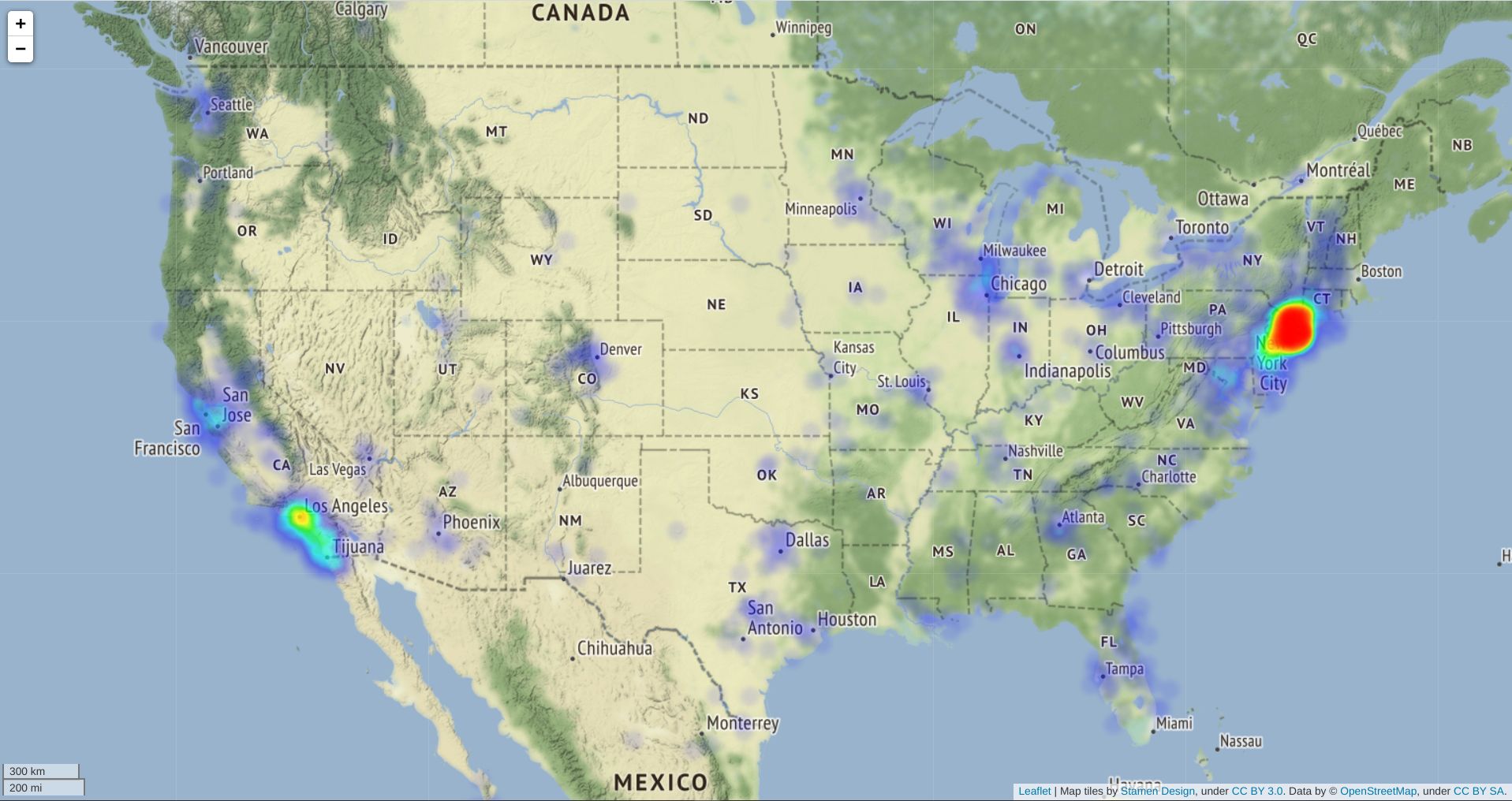
<p>I collected some of the exposed locations for a short amount of time after the disclosure. I figured it would be a waste not to share a visualization.</p>

<p><strong>Note:</strong> I’ve taken steps to protect the privacy and safety of LINK users</p>
<ul>
  <li>Randomizing coordinates in the magnitude of tens of miles.</li>
  <li>Restricting locations to be in North America, as most users are from America and I don’t wanna look at GDPR laws.</li>
</ul>

<!-- TODO: Allow images to expand full screen when clicked on -->
<figure>
    <div class="col-md-12" style="display: flex; justify-content: center;">
        <div>       
            
                <a class="no_icon" target="_blank" rel="noopener" href="/assets/posts/link_social_exposing_sensitive_personal_information/link-visualized.html">
            
            <img class="img-fluid" src="/assets/posts/link_social_exposing_sensitive_personal_information/link-visualized.png" alt="LINK User Locations" style="max-width: 40rem;width:100%;" />
            
                </a>
            
                <figcaption style="text-align: center;">Visualization of LINK user locations (click for interactive map)</figcaption>
            
        </div>
    </div>
</figure>

<h3 id="links-response">LINK’s Response</h3>

<p>They were relatively prompt with fixing the app and the issues that I mentioned, and fixed it by the end of the 2nd business day. The one bit of information still exposed is the birthday of a user, which isn’t that big of a deal however it would be nice to see it calculated server-side.</p>

<p>I think the response from them was great, however I do find it concerning how insecure their system was while storing tons of user data.</p>

<h3 id="takeaways">Takeaways</h3>
<ul>
  <li>Always assume that the information you’re sending away from your database can be viewed by the client and consider the risk of that
    <ul>
      <li>If it’s an app, imagine the end user is able to see all that information for themselves</li>
    </ul>
  </li>
  <li>Ensure that authorization tokens are only sent back when you know for sure that the person requesting them is really that user
    <ul>
      <li>They should only be sent back after a successful login or an account creation</li>
      <li>Should never be able to get an auth token without providing credentials or making a new account</li>
    </ul>
  </li>
  <li>Always analyze and ensure that your system is secure even if you were to provide the public with the exact API documentation of your app</li>
  <li>Be cautious of what data you’re giving to apps especially new ones
    <ul>
      <li>The app was using a 3rd party service to verify identities using photos of photo ID cards</li>
      <li>As far as I know there wasn’t any data leaks around this, but based on how insecure their servers were I personally wouldn’t trust an app to manage my ID</li>
    </ul>
  </li>
  <li>Don’t follow security researchers on Instagram as part of a marketing campaign if your app isn’t secure
    <ul>
      <li>But what you can do is follow a security researcher (myself) on <a href="https://twitter.com/david_teather" target="_blank">Twitter</a> or <a href="https://www.linkedin.com/in/davidteather/" target="_blank">LinkedIn</a> :)</li>
      <li>If you have any recommendations to what apps/websites I investigate next please let me know 👀</li>
    </ul>
  </li>
</ul>]]></content><author><name>David Teather</name></author><category term="link.social" /><category term="security" /><category term="analysis" /><category term="reverse-engineering" /><summary type="html"><![CDATA[On July 9th I was able to access sensitive information from every account on link.social’s app. This information includes: phone number, last location (accurate to within 10-15 feet), birthday, and if they verified their identity with a government photo ID card, and some other less sensitive fields. In addition to this, I found a simple exploit that allows me to hijack any account on the platform.]]></summary></entry><entry><title type="html">YikYak Is Exposing Millions of User Locations</title><link href="https://theresponsetimes.com/yikyak-is-exposing-user-locations/" rel="alternate" type="text/html" title="YikYak Is Exposing Millions of User Locations" /><published>2022-05-09T16:00:00+00:00</published><updated>2022-05-09T16:00:00+00:00</updated><id>https://theresponsetimes.com/yikyak-is-exposing-user-locations</id><content type="html" xml:base="https://theresponsetimes.com/yikyak-is-exposing-user-locations/"><![CDATA[<p>I was able to access the precise GPS coordinates (accurate to within 10-15ft) of all posts and comments on the YikYak platform, this leaves at least <a href="https://twitter.com/YikYakApp/status/1458110405348368393" target="_blank">2 million users</a> at risk. This number is likely higher, as this user count is 6 months old.</p>

<p>I disclosed what I found to the YikYak team on April 11th 2022. Almost a month later on May 8th 2022 (1 day before public disclosure date), they responded by removing the user id being returned for posts and comments however this is not enough to protect privacy as it’s trivial to regain this information.</p>

<p><strong>Edit (May 18th)</strong>: YikYak has made what I consider substantial changes, more under the <a href="#have-things-changed">have things changed</a> section.</p>

<p><strong>Edit (May 11th)</strong>: YikYak has made more changes detailed in the <a href="#have-things-changed">have things changed</a> section.</p>

<h3 id="table-of-contents">Table of Contents</h3>

<ul>
  <li><a href="#what-is-yikyak">What Is YikYak</a></li>
  <li><a href="#what-data-is-exposed">What Data Is Exposed</a>
    <ul>
      <li><a href="#why-its-a-problem">Why It’s a Problem</a></li>
      <li><a href="#mitigations-recommended">Mitigations Recommended</a></li>
      <li><a href="#yikyaks-response">YikYak’s Response</a></li>
    </ul>
  </li>
  <li><a href="#how-i-discovered-this">How I Discovered It</a></li>
  <li><a href="#data-visualization">Data Visualization</a>
    <ul>
      <li><a href="#what-the-data-tell-us">What The Data Tell Us</a></li>
    </ul>
  </li>
  <li><a href="#what-can-yikyak-users-do-to-protect-themselves">What Can YikYak Users Do To Protect Themselves?</a></li>
  <li><a href="#takeaways">Takeaways</a></li>
</ul>

<h3 id="what-is-yikyak">What is YikYak</h3>
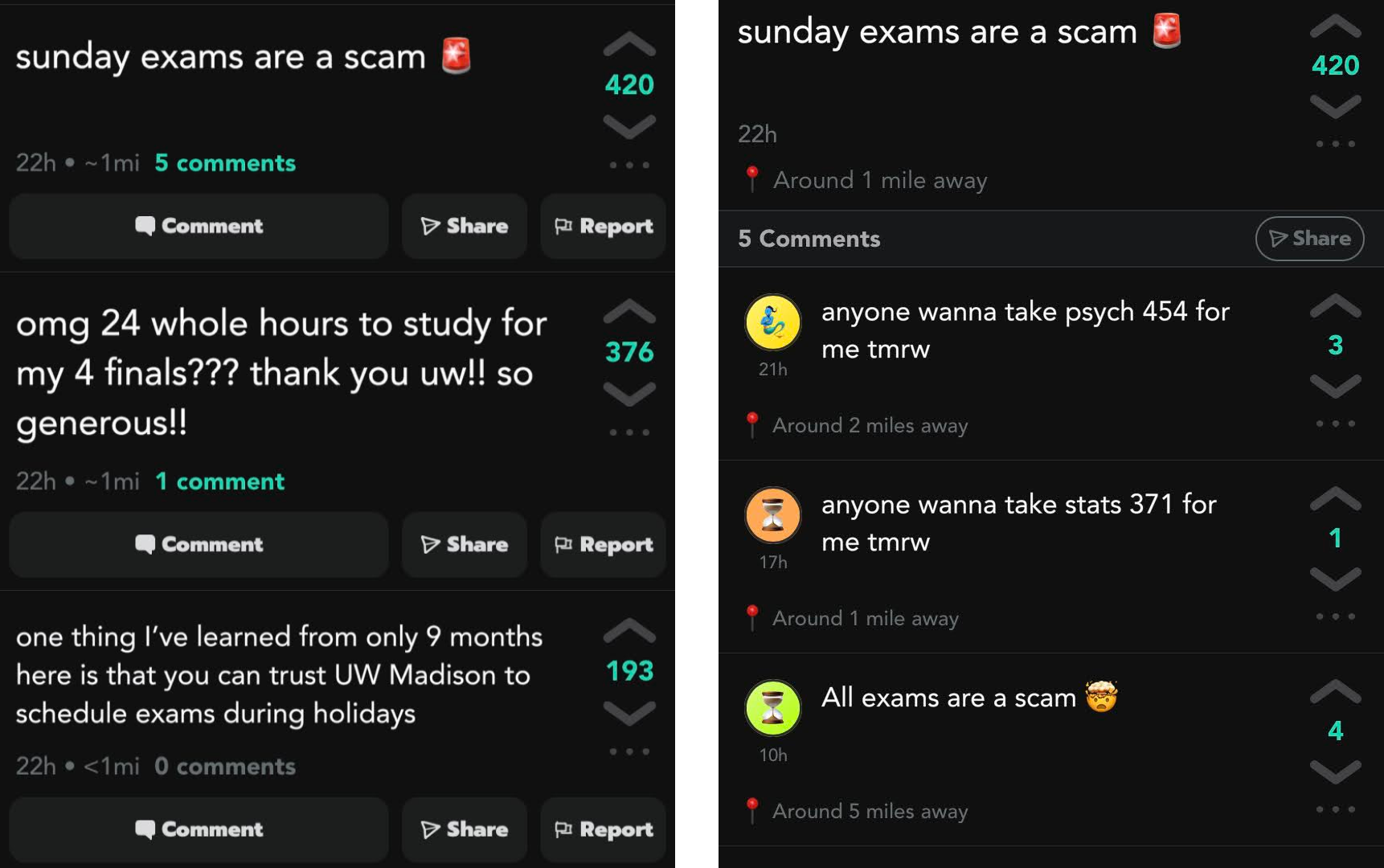
<p>YikYak is a pseudonymous messaging board, where users can see posts within a radius of 5 miles. Each user has an emoji and color to distinguish individuals, these can be reset if the user chooses. This feature allows conversation chains to continue in comment sections where users can interact.</p>

<p>Each post has a location associated with it by design, and when viewing a post the app displays how far away they are from you. The main target audience for YikYak is college students on college campuses.</p>

<!-- TODO: Allow images to expand full screen when clicked on -->
<figure>
    <div class="col-md-12" style="display: flex; justify-content: center;">
        <div>       
            
            <img class="img-fluid" src="/assets/posts/yikyak_exposed_locations/yikyak-app.png" alt="YikYak App Screenshot" style="max-width: 35rem;width:100%;" />
            
            
                <figcaption style="text-align: center;">YikYak feed and post with comments</figcaption>
            
        </div>
    </div>
</figure>

<h3 id="what-data-is-exposed">What Data Is Exposed</h3>

<ul>
  <li>On All Posts &amp; Comments
    <ul>
      <li>Precise GPS Coordinates (accurate to within 10-15 ft)</li>
      <li>A user id (persistent across posts even if a user resets their avatar)
        <ul>
          <li>After YikYak’s update on May 8th it takes maybe a few minutes of guessing to get this data back by manipulating the graphql query</li>
        </ul>
      </li>
    </ul>
  </li>
</ul>

<h4 id="why-its-a-problem">Why It’s a Problem</h4>

<p>Location data itself isn’t problematic for an app like this, it is problematic when the precise GPS coordinates are sent to the client and user ids are exposed. Combining these two pieces of information it is possible to de-anonymize users, since people are more likely to use their phones thus YikYak at home it’s possible to figure out the area where a user lives within 10-15 feet. This ability to de-anonymize is much more of a risk in low density rural areas where detached single-resident buildings are more than 10-15 feet apart, as a single GPS location narrows down a user to one address.</p>

<p>Since user ids are persistent it’s possible to figure out a user’s daily routine of when and where they post YikYaks from, this can be used to find out the daily routine of a particular YikYak user.</p>

<p>A non-exhaustive list of what a malicious actor could do with GPS data</p>
<ul>
  <li>Break into a building when they know a YikYak user is somewhere else (on vacation or just not home)</li>
  <li>Stalk YikYak users by tracking the GPS location of their posts</li>
  <li>Unlawfully surveil and monitor users</li>
</ul>

<h4 id="mitigations-recommended">Mitigations Recommended</h4>

<p>In my email to the YikYak team I recommended some fixes they could implement in order to increase anonymity. I’ve ordered them from in my opinion what’s the most effective to the least effective.</p>

<ol>
  <li>Truncate the GPS coordinate to only use a few decimal places such as 2 or 3, as this makes the location inaccurate to 0.6 miles or 300 feet respectively according to <a href="http://wiki.gis.com/wiki/index.php/Decimal_degrees" target="_blank">Wiki GIS</a>.</li>
  <li>Change the API to calculate the distance from the client server-side, so that GPS coordinates are never sent to the client.</li>
  <li>Don’t display how far the poster is from the client, or just randomly generate how far away people are from each other.</li>
  <li>Don’t return user ids to the client when querying for posts/comments.</li>
</ol>

<p>The most logical and efficient way to protect user privacy is to implement option number one, as this destroys the information ensuring nobody is ever able to recover the exact location again. The other options leave de-anonymization of users possible through other means. Despite this, on May 8th 2022 YikYak decided to go with option four after nearly a month to prepare for public disclosure.</p>

<h4 id="yikyaks-response">YikYak’s Response</h4>

<p>YikYak sent this a few days after my initial disclosure email to them.</p>

<blockquote>
  <p>We’re working on fixes to stop exposing user IDs to clients and soften how location is exposed</p>
</blockquote>

<p>They then asked me to push back my initial disclosure date another 2 weeks to May 9th 2022, which I agreed to.</p>

<h4 id="have-things-changed">Have Things Changed</h4>

<p>As of writing on May 9th things have not significantly changed. YikYak responded by removing the user id field being returned for posts and comments however this is not enough to protect user privacy. It’s still fairly trivial to access this information and would take only a few minutes to guess and check.</p>

<p>YikYak released a “Summer Spaceship” feature which allows users to save a GPS location and act as if they’re at that location when posting and viewing content on the app. This feature could allow for users who care about their privacy to set their location to be in a busy place to protect their anonymity. However, it does not appear that this feature is meant to protect user privacy and the branding around this feature does not reflect that this was the intention of the feature.</p>

<p><strong>Edit May 18th</strong>: YikYak has rounded all GPS coordinates sent to the client, as well as the distances to various users. This is what I suggested to them, I’m assuming that the coordinates are only rendered server-side which is an improvement. Since the information isn’t destroyed, it is possible that some attack in the future could leave the exact coordinates exposed. Despite this, I’m glad that they finally changed things and the app is more secure for the privacy of individual users.</p>

<p><strong>Edit (May 11th)</strong>: YikYak has released version 1.4.3 which does calculate the distance to each post in feet, however since this is not rounded it’s still possible for trilateration the location of the post. Furthermore, it is <strong>still possible</strong> to get the user ID and exact location based on the API requests of older versions. This could be temporary to provide backwards compatibility with older versions of the app. If YikYak did take this more seriously they would restrict these fields from being returned and break older versions and force users to upgrade to a newer version of the app.</p>

<h3 id="how-i-discovered-this">How I Discovered This</h3>

<p>I intercepted the HTTP requests from the app by using <a href="https://mitmproxy.org/" target="_blank">mitmproxy</a>, next I wrote some code that pretended to be the YikYak app to extract information from it. I then realized that YikYak was exposing the precise GPS coordinates of every poster and commenter to the client, which is when I started drafting up an email to YikYak and collecting some GPS coordinates to visualize some data.</p>

<p><strong>Aside</strong>: If you want to learn how to intercept information like what this article is about, I’m working on a free YouTube series on <a href="https://www.youtube.com/c/David Teather Codes?sub_confirmation=1" target="_blank">David Teather Codes</a> that will teach you how! So please subscribe, if that’s not your thing I’ve got a lot more content planned.</p>

<h3 id="data-visualization">Data Visualization</h3>

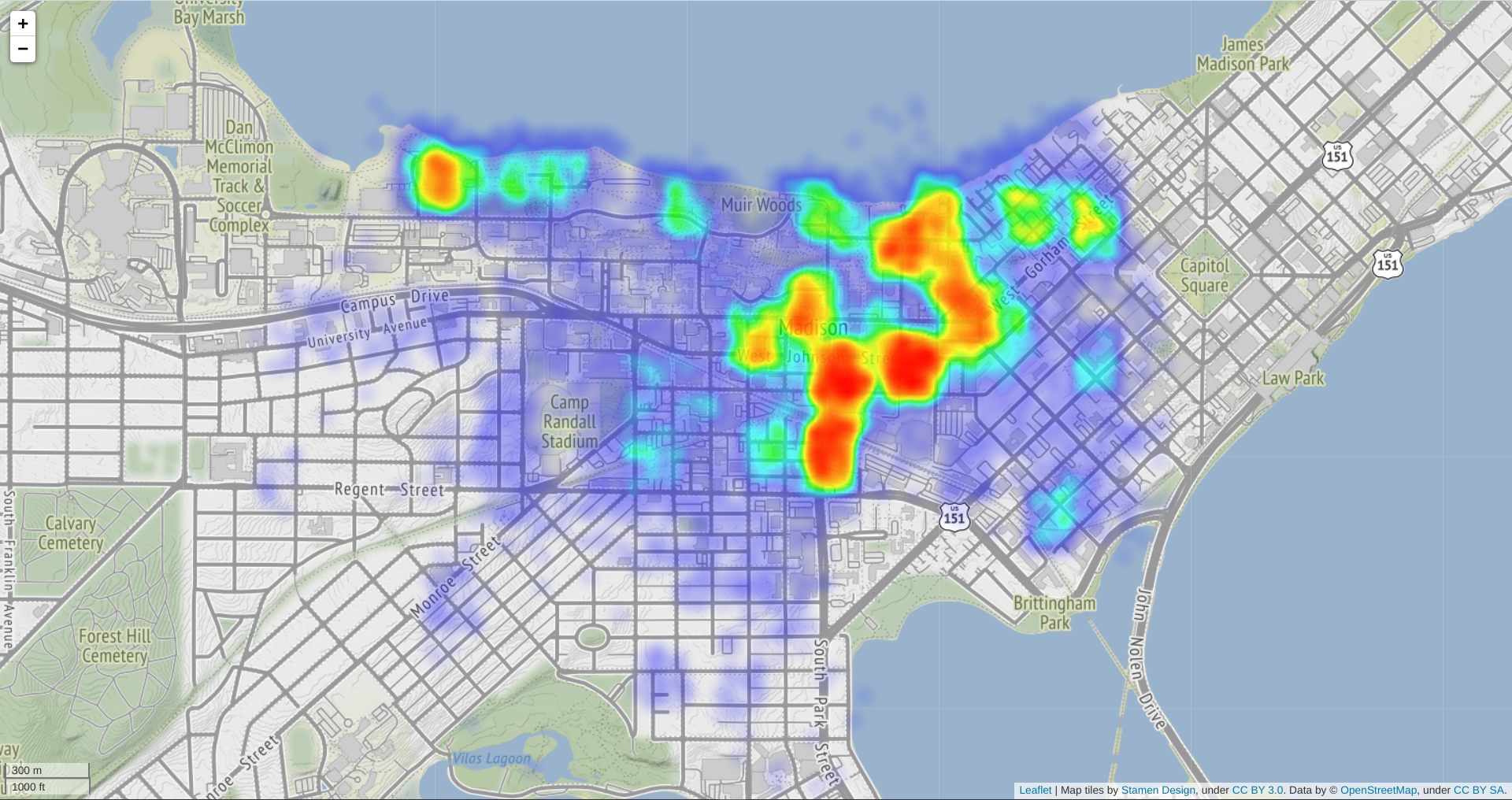
<p>I collected some of the exposed user data for a short amount of time after the disclosure to YikYak. I figured it would be a waste not to share a cool looking visualization.</p>

<p><strong>Note:</strong> I’ve taken steps to protect the privacy and safety of YikYak users.</p>
<ul>
  <li>Randomized GPS Coordinates</li>
  <li>Restricted the radius of visualized points to only include high density blocks, so that individual points cannot be pinned to a particular address</li>
</ul>

<!-- TODO: Allow images to expand full screen when clicked on -->
<figure>
    <div class="col-md-12" style="display: flex; justify-content: center;">
        <div>       
            
                <a class="no_icon" target="_blank" rel="noopener" href="/assets/posts/yikyak_exposed_locations/yikyak-visualized.html">
            
            <img class="img-fluid" src="/assets/posts/yikyak_exposed_locations/visualization-preview.png" alt="YikYak App Screenshot" style="max-width: 40rem;width:100%;" />
            
                </a>
            
                <figcaption style="text-align: center;">Visualization of YikYak locations in Madison, WI (click for interactive map)</figcaption>
            
        </div>
    </div>
</figure>

<h4 id="what-the-data-tell-us">What The Data Tell Us</h4>
<ul>
  <li>College students use YikYak the most</li>
  <li>Student dorms and libraries are the “hottest” areas</li>
  <li>Not much else to be honest</li>
</ul>

<h3 id="what-can-yikyak-users-do-to-protect-themselves">What Can YikYak Users Do To Protect Themselves?</h3>
<p>Don’t use YikYak in a place where you wouldn’t broadcast your GPS coordinates to strangers.</p>

<p>If this isn’t a sacrifice you’re willing to make, YikYak introduced a “summer spaceship” feature which allows you to save your GPS location and act as if you were at that location. You could set this location to be in a public place like a campus union, so that it’s harder to de-anonymize you. I haven’t done my own analysis to see if this hides your actual GPS location, but if implemented properly it would let you mask your actual location, thus protecting your privacy.</p>

<h3 id="takeaways">Takeaways</h3>

<ul>
  <li>“Anonymous” messaging apps don’t exist</li>
  <li>Apps we use without thinking may be putting us at risk to malicious actors, when we have little knowledge or control over how securely our information is stored</li>
  <li>If you’re designing an app that sends sensitive information to a client, it’s best to not send it at all and when possible anonymize it</li>
</ul>

<p>Hope you enjoyed :)</p>]]></content><author><name>David Teather</name></author><category term="YikYak" /><category term="security" /><category term="analysis" /><category term="reverse-engineering" /><summary type="html"><![CDATA[I was able to access the precise GPS coordinates (accurate to within 10-15ft) of all posts and comments on the YikYak platform, this leaves at least 2 million users at risk. This number is likely higher, as this user count is 6 months old.]]></summary></entry></feed>